Loading lesson…
What a prompt is and is not
20 min read
Before you can write a good prompt, you need an accurate picture of what happens when you type one. This module gives you that picture in plain terms. It matters the first time you ask an AI chat tool to draft an email, plan a trip, or explain a policy, and it matters every time after that, because most early mistakes come from expecting the tool to know things it was never given.
What you will be able to do
- Describe a prompt as interaction input: the text, files, and settings you give the tool in one exchange (Prompt as interaction input).
- Expand the acronym LLM and explain, in one sentence, what that kind of model does (Expand the LLM acronym, Generation and model output).
- Explain why a well-written prompt still does not make the answer correct (Prompts do not guarantee correctness).
- Decide what to restate when you open a new chat, and when a question needs a current source instead of the model's training (New-chat context and product memory, Training cutoff and live-source freshness).
- Turn a list of trip needs into clear prompt requirements (Translate trip needs into prompt requirements).
The idea
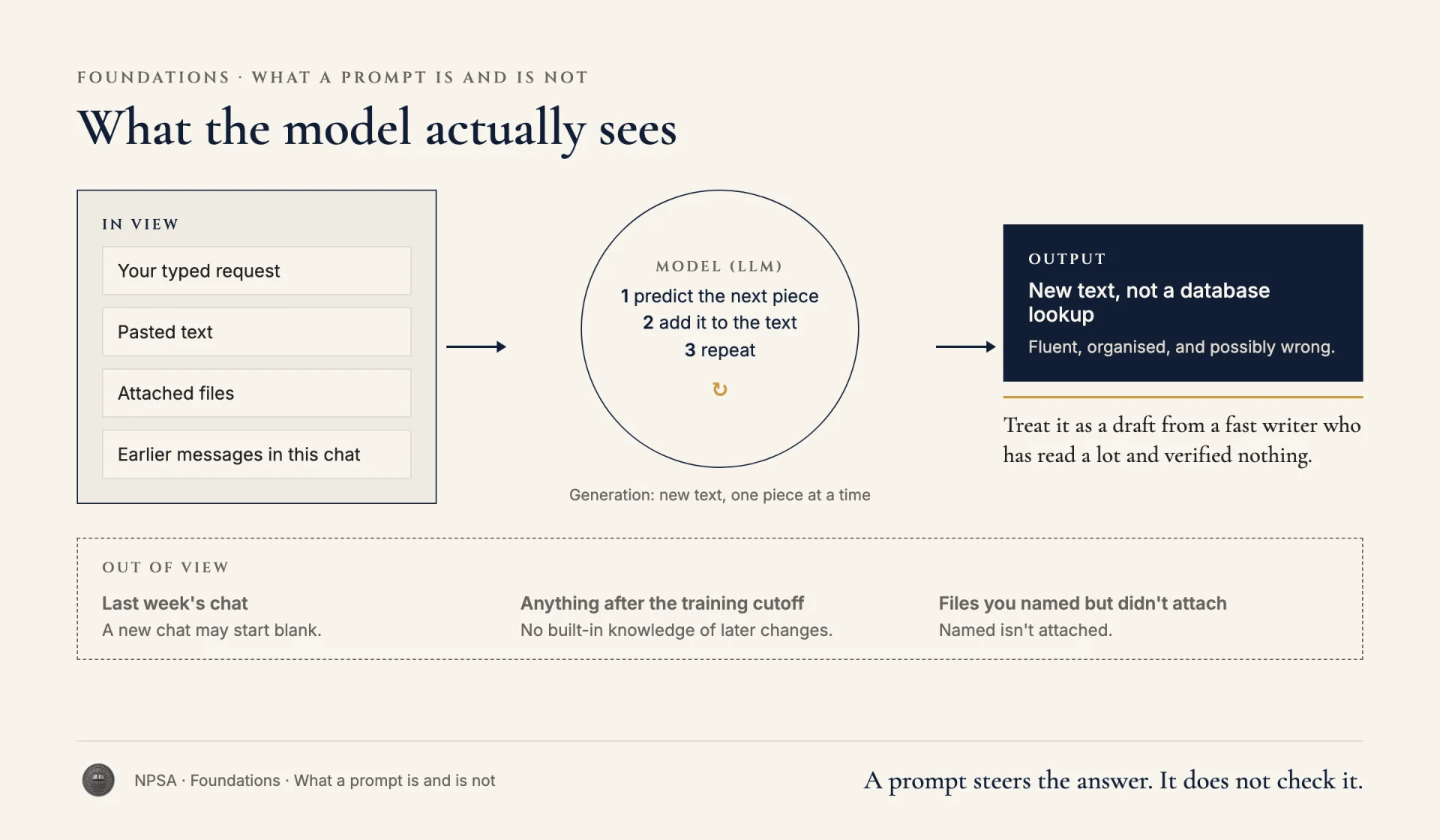
Most AI chat tools run on a large language model, or LLM. An LLM is trained on a very large amount of text and learns patterns in how words, facts, and formats tend to go together. When you send it something, it generates new text that fits those patterns and whatever you gave it.
Four terms are worth keeping apart:
- Prompt. Your input for this exchange. It includes your typed request and anything else the tool can actually see: pasted text, attached files, earlier messages in the same chat.
- Model. The LLM doing the work.
- Generation. The process of producing new text, one piece at a time.
- Output. What comes back. It is new content, not a lookup from a database.
That last point explains a lot. Because the output is generated, it can be fluent, well organized, and wrong. A prompt steers the answer. It does not check it. You can write a very clear prompt and still get a date that is off by a year or a fee that was never real. Treat the output as a draft from a fast writer who has read a lot and verified nothing.
Two more boundaries trip people up.
A new chat may be a blank start. Many tools only see the current conversation. Some products offer saved memory or project files, but even then you can't assume a detail from last week's chat is available, complete, or still true. If something matters, put it in the current chat.
Training has a cutoff. The model learned from text up to some date. It has no built-in knowledge of what changed after that, such as this month's prices, a new store schedule, or a flight that was rescheduled yesterday. Some tools can search the web or read a file you attach. If yours can't, any answer about current facts is a guess dressed as an answer. For anything time-sensitive, ask for a dated source or check it yourself.
Worked example
Dana Ruiz, a recruiter at a regional hospital, needs to plan a two-day trip to a nursing job fair in Columbus, Ohio, on March 12–13. Her needs are concrete: she leaves from Pittsburgh, can't leave before 7:00 a.m. on the 12th because of an early call, needs a hotel within a 15-minute walk of the convention center, has a $180 per night lodging limit, and has to be back by 6:00 p.m. on the 13th. She opens a fresh chat.
Before:
Plan my trip to the Columbus job fair like we talked about. Find me
the best train and a good hotel.
That prompt depends on a past conversation the tool may not see. "Best" and "good" have no measurable meaning. And "find me the best train" invites the model to produce a schedule from memory, which may be out of date or invented.
After:
I'm planning a work trip and need a draft plan I can check.

Trip facts:
- From Pittsburgh, PA to Columbus, OH convention center
- Depart no earlier than 7:00 a.m. on March 12
- Back in Pittsburgh by 6:00 p.m. on March 13
- Hotel: within a 15-minute walk of the convention center,
  $180 per night or less

Task: Lay out my travel options (driving, bus, or rail) as a short
list, with the questions I should check for each. If you cannot see
current schedules or rates, say so and do not give specific times
or prices. List the hotel requirements as a checklist I can use
when I search.
Why this is stronger. Dana translated each trip need into a requirement the output can be checked against: times, distance, and a dollar limit. She gave the new chat its own brief instead of relying on memory. And she told the tool what to do about freshness, so it won't present an old timetable as today's. The plan she gets back is a starting point, and she still confirms times and rates on the carriers' and hotels' own sites before booking.
Try it
Setup. Pick a real or made-up trip: a one-day visit to a client, a weekend at a family event, a training course in another city.
Task. In a text editor, write down your needs as plain notes first: where from, where to, dates, earliest and latest times, budget, and any must-haves. Then turn those notes into a prompt like Dana's After version. Paste it into any chat tool and read the reply.
What a good result looks like. Every need in your notes appears in the prompt as a specific requirement with a number or a clear condition. The prompt doesn't refer to earlier chats. The reply either cites a dated source for times and prices or says it can't confirm them. If the reply gives you a confident train time with no source, you've found exactly the gap this module is about.
Watch for this
A polished answer feels trustworthy. Notice when you're relaxing because the formatting looks professional. Formatting is generated too.
Recap
- A prompt is your input for one exchange, including anything the tool can actually see.
- LLM stands for large language model. It generates output from learned patterns and your input.
- A clear prompt improves the answer but does not make it correct.
- Restate what matters in a new chat, and use a current source for anything time-sensitive.
- Turn needs into requirements with numbers, dates, and limits you can check.