Loading lesson…
Iterating without guessing
20 min read
The first answer is rarely the one you use. What separates a quick fix from an hour of rewording is how you follow up. This module shows you how to improve an output with one focused change at a time, and how to clear up missing information before it spreads through every draft. You'll use it whenever an AI draft is close but not right.
What you will be able to do
- Name the specific gap in an output and write a follow-up that changes only that (Targeted iteration).
- Change one thing at a time so you can tell what fixed the problem (Targeted iteration).
- Spot missing facts or unclear words in your own request and supply them before asking again (Resolve missing input and ambiguity).
- Ask the tool to list what it needs before it drafts (Resolve missing input and ambiguity).
- Decide when a simpler tool or a shorter prompt is the better next step (Targeted iteration).
The idea
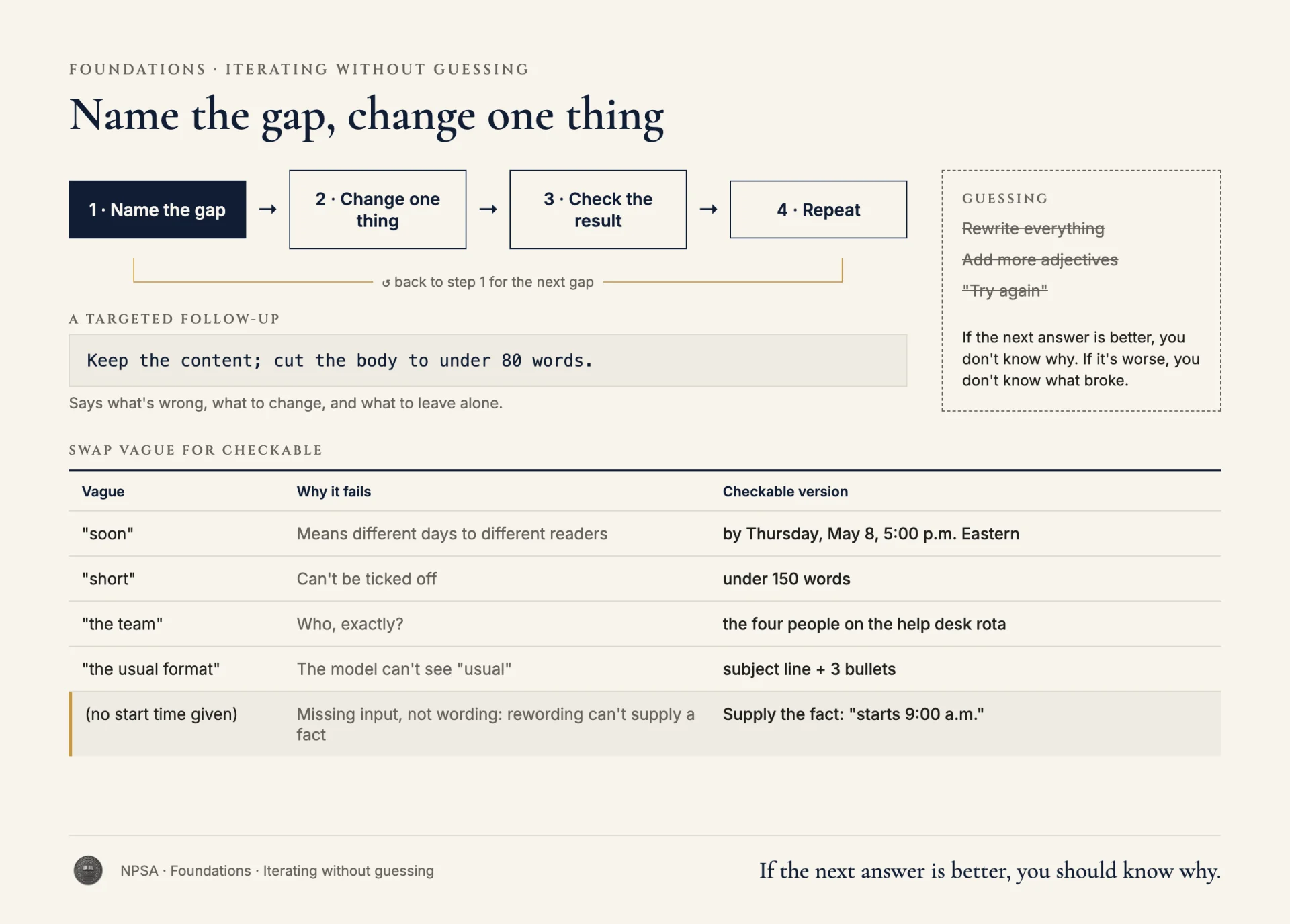
When an output misses, the natural reaction is to rewrite the whole prompt, add more adjectives, or type "try again." Each of those is a guess. If the next answer is better, you don't know why. If it's worse, you don't know what broke.
Targeted iteration works like a careful repair:
- Name the gap. Compare the output with what you needed. Is it too long? Missing a fact? Wrong audience? Wrong format? Pick the most important gap.
- Change one thing. Write a follow-up that addresses that gap and says what to keep. "Keep the content; cut the body to under 80 words" is a targeted change.
- Check the result. Did that gap close? Did anything that was right before get lost?
- Repeat if needed. Move to the next gap.
A good follow-up tells the tool what's wrong, what to change, and what to leave alone.
Sometimes the gap isn't in the wording at all. It's missing input. If you ask for a schedule and never said the start time, no amount of rephrasing will fix it. The model will invent a start time, and the invention will carry into every revision. The fix is to supply the fact.
Ambiguity works the same way. Words like "soon," "next week," "the team," "short," and "the usual format" mean different things to different people. Replace them with specifics: "by Thursday, May 8, 5:00 p.m. Eastern," "the four people on the help desk rota," "under 150 words."
If you're not sure what's missing, ask. "Before drafting, list any facts you'd need from me and any terms that are unclear" turns the tool into a checklist for your own request.
Finally, the right next step isn't always a longer prompt. If the task is converting 90 minutes to hours or counting words, a calculator, spreadsheet, or word counter gives an exact answer with no checking. Use the simplest tool that does the job.
Worked example
Marcus Bell works on an IT help desk. He asks an AI tool to draft a help article about resetting a work password. The first output is 600 words, uses terms like "SSPR" and "MFA" without explaining them, and says users should "call the help desk" with no number. It also tells users to reset "from any device," which isn't true at his company: resets only work on a company laptop or through the self-service page.
Marcus's first instinct:
Before:
That's not right. Make it simpler and better for normal people.
Try again.
That follow-up changes everything at once and specifies nothing. The next draft might be shorter but still wrong about devices, still missing the phone number, and now missing steps that were fine.
Instead, Marcus fixes the missing input first, then targets the biggest gap.
After:
Keep the same steps and order. Make these changes only:
1. Replace "from any device" with: resets work only on a company
   laptop or at reset.example.com.
2. Help desk number: 555-0199, staffed 7:00 a.m. to 7:00 p.m. Eastern,
   Monday to Friday. Add it in the final step.
3. Write for staff who don't know IT terms. Spell out any acronym the
   first time, or remove it.
4. Body under 250 words.
Before you revise, tell me if any step still depends on a fact I
haven't given you.
Why this is stronger. It keeps what was working and lists exactly what to change. It supplies the two facts the model was guessing about: where resets work and the phone number. It replaces "simpler" with a word limit and a plain rule about acronyms. The last line asks the tool to flag remaining gaps, so Marcus finds missing input now instead of in the next draft. When the revision comes back, he can check each of the four changes in under a minute.
Doesn't four changes break the one-thing-at-a-time rule? Changing one thing at a time matters when you don't know what's causing a problem, because it shows you which change fixed it. Marcus already knows exactly what's wrong with each item, and every fix is specific and easy to check. If a later draft goes wrong in a way he can't explain, he goes back to changing one thing at a time.
Try it
Setup. Ask any chat tool to write a short notice: an office closure, a schedule change, or a reminder about a deadline. Use a deliberately vague request, such as "Write a notice that the office is closed soon."
Task. Read the output and write down every detail the tool had to guess (dates, times, reasons, who to contact). Then write one follow-up that supplies those facts and changes only what needs changing. Note what you kept the same.
What a good result looks like. Your follow-up names specific facts and specific changes, not adjectives. The revised notice contains no invented dates or contacts. If you compare the two versions, you can point to each difference and say which line of your follow-up caused it.
Watch for this
Long chats drift. After many revisions, an earlier correction can quietly come undone. If that happens, start a new chat with a clean, complete prompt that includes everything you've settled.
Recap
- Name one gap, change one thing, check the result.
- Tell the tool what to keep as well as what to change.
- Missing facts can't be fixed by rewording. Supply them.
- Replace vague words with dates, numbers, and names.
- For exact, simple tasks, a calculator or spreadsheet may beat a prompt.