Loading lesson…
Choosing and writing examples
20 min read
Examples are one of the strongest tools in a prompt. A few well-chosen ones can teach a format or a judgment rule faster than a paragraph of instructions. Badly chosen ones teach the wrong rule just as fast. This module covers how to pick examples that represent your real inputs, how to test a prompt beyond the one case that worked, and how to find the actual cause when it fails.
What you will be able to do
- Choose examples where Representative examples convey a pattern that matches the variety in your real inputs.
- Test representative inputs beyond one success before you reuse a prompt.
- Reproduce failures with fixed inputs so you can tell whether a change fixed anything.
- Diagnose and target the actual prompt defect instead of adding emphasis or more rules.
The idea
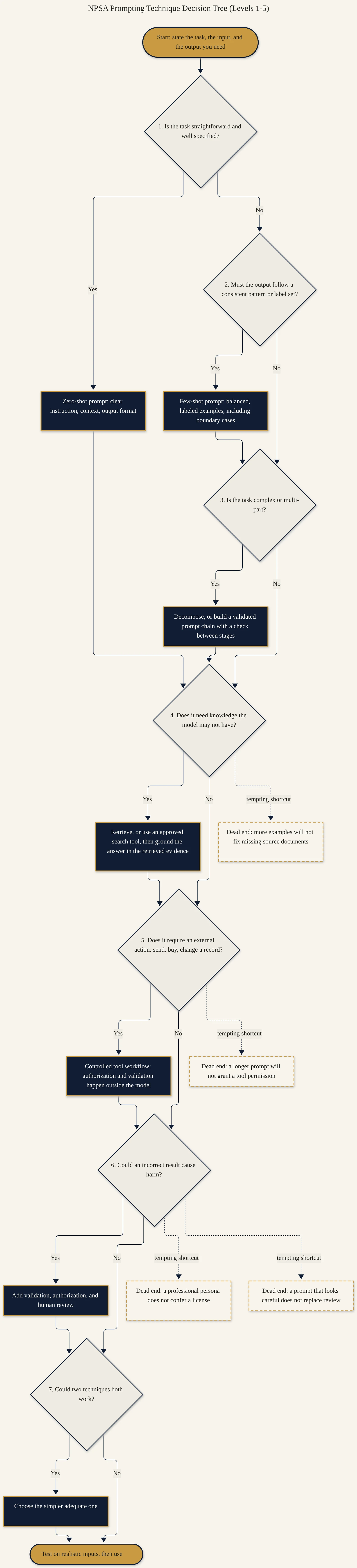
An example says "inputs like this produce outputs like that." The model generalizes from what you show. If every example is easy, short, and clearly one category, the model learns that pattern, and it may guess on anything messier.
Pick examples that cover the spread. Look at 20 or 30 real inputs and sort them roughly. Include at least one example from each common type, plus one hard case: an input that's ambiguous, incomplete, or near a boundary. Show what the output should be when information is missing. If you only show complete inputs, the model will invent the missing piece.
Vary what should vary. If all your examples are the same length or use the same customer name, the model may copy those details. Change the surface details so the only thing the examples share is the pattern you want.
One success proves little. A prompt that works on the input you wrote it for has been tested once. Before you reuse it, build a small test set: normal cases, edge cases, a missing-field case, and a case that should be rejected. Keep the set saved.
Reproduce before you fix. When something fails, save the exact input that failed. Rerun it with the same prompt and settings to confirm it fails consistently. Then change one thing and rerun the whole set. If you change the prompt and the input at the same time, you can't tell what helped.
Fix the real defect. "Be more careful" and "never make mistakes" rarely help. Ask what the failing inputs have in common. Often it's a missing field, a category the examples never showed, or two instructions that conflict. Target that.
Worked example
Tomás Reyes runs a small billing support team. He built a prompt that sorts incoming tickets into four categories: refund request, payment failed, invoice question, or other. It has three examples, all short and clear. It worked on the first ticket he tried. In week two, agents notice that tickets mentioning both a failed card and a refund keep landing in "other," and tickets with no description at all are labeled "invoice question."
Before:
Classify each ticket as refund request, payment failed, invoice
question, or other. Be very accurate. Think carefully. Never put a
ticket in the wrong category.

Example: "I want my money back for order 5521." -> refund request
Example: "My card was declined." -> payment failed
Example: "Can I get a copy of invoice 3390?" -> invoice question
Tomás saves the 14 tickets that were wrong and reruns them with no changes. All 14 fail again, so the problem is reproducible. Sorting them shows two patterns: mixed-issue tickets, and tickets with an empty description field. Neither appears in his examples, and the prompt says nothing about them. More emphasis wouldn't fix either one.
After:
Classify each ticket into one category: refund request, payment
failed, invoice question, needs info, or other.

Rules:
- If a ticket mentions a failed payment and a refund, use
  "payment failed" and add "also mentions refund" in a note.
- If the description is empty or under 5 words, use "needs info".

Examples:
"Card declined twice, then I was charged anyway. Refund please."
  -> payment failed (also mentions refund)
"Need the PDF for invoice 7104, our accounts team lost it."
  -> invoice question
"Want to cancel and get the last 2 months back."
  -> refund request
"" -> needs info
"Where do I change my company address?" -> other
Why this is stronger. The examples now cover the types of tickets that actually arrive, including the two that failed. Each failure has an explicit rule rather than a plea for accuracy. Tomás reruns the 14 saved failures and his original 20 good tickets with the new prompt. Both sets need to pass before the team uses it again.
Try it
Setup. Pick a sorting or labeling task you do often: tagging emails, labeling feedback, categorizing expenses. Copy 15 real or realistic inputs into a spreadsheet, one per row, with the label you'd give each in the next column.
Task. Write a prompt with three examples. Run all 15 inputs and record the model's label in a third column. Mark mismatches. Group the mismatches by what they have in common, then change one thing in the prompt (an example or a rule) and rerun all 15.
What a good result looks like. You can name the cause of each group of failures. Your change fixes at least one group without breaking rows that were correct before. The spreadsheet shows both runs, so anyone can see what changed.
Recap
- Examples teach a pattern. Make them as varied as your real inputs.
- Include a hard case and a missing-information case.
- Test on a saved set, not on the one input that worked.
- Reproduce a failure with the same input before trying to fix it.
- Find what the failures share and fix that, one change at a time.