Loading lesson…
Evals: building the set
20 min read
An eval is a fixed set of test cases plus a way to score outputs against them. It's how you find out whether a prompt works in general, not just on the input you happened to try. This module covers how to build that set, how to choose and balance the examples inside the prompt, and how to write a rubric that two reviewers would apply the same way.
What you will be able to do
- Select zero-shot or few-shot prompting based on the task and a measured baseline.
- Design representative, consistent few-shot boundary examples, knowing that Example imbalance can bias responses.
- Vary examples while stating invariant features so the model learns the rule, not the surface.
- Build a test set on the principle that Generalization requires multiple representative cases, and Compare prompts on fixed test cases.
- Write Rubric criteria and observable anchors, and use Controlled debugging with fixed cases and rubric.
- Design lesson-aligned practice assessment with keys using the same discipline.
The idea
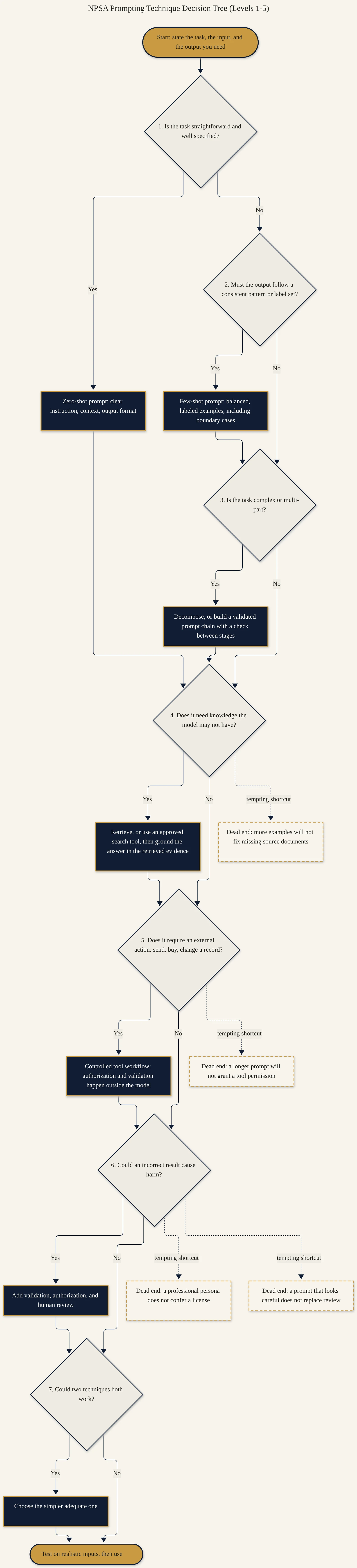
Start zero-shot. Clear instructions with no examples are the baseline. If that baseline scores well on your test set, examples add tokens without adding value. Add few-shot examples when the format or the judgment is hard to describe in words, then measure whether they actually help.
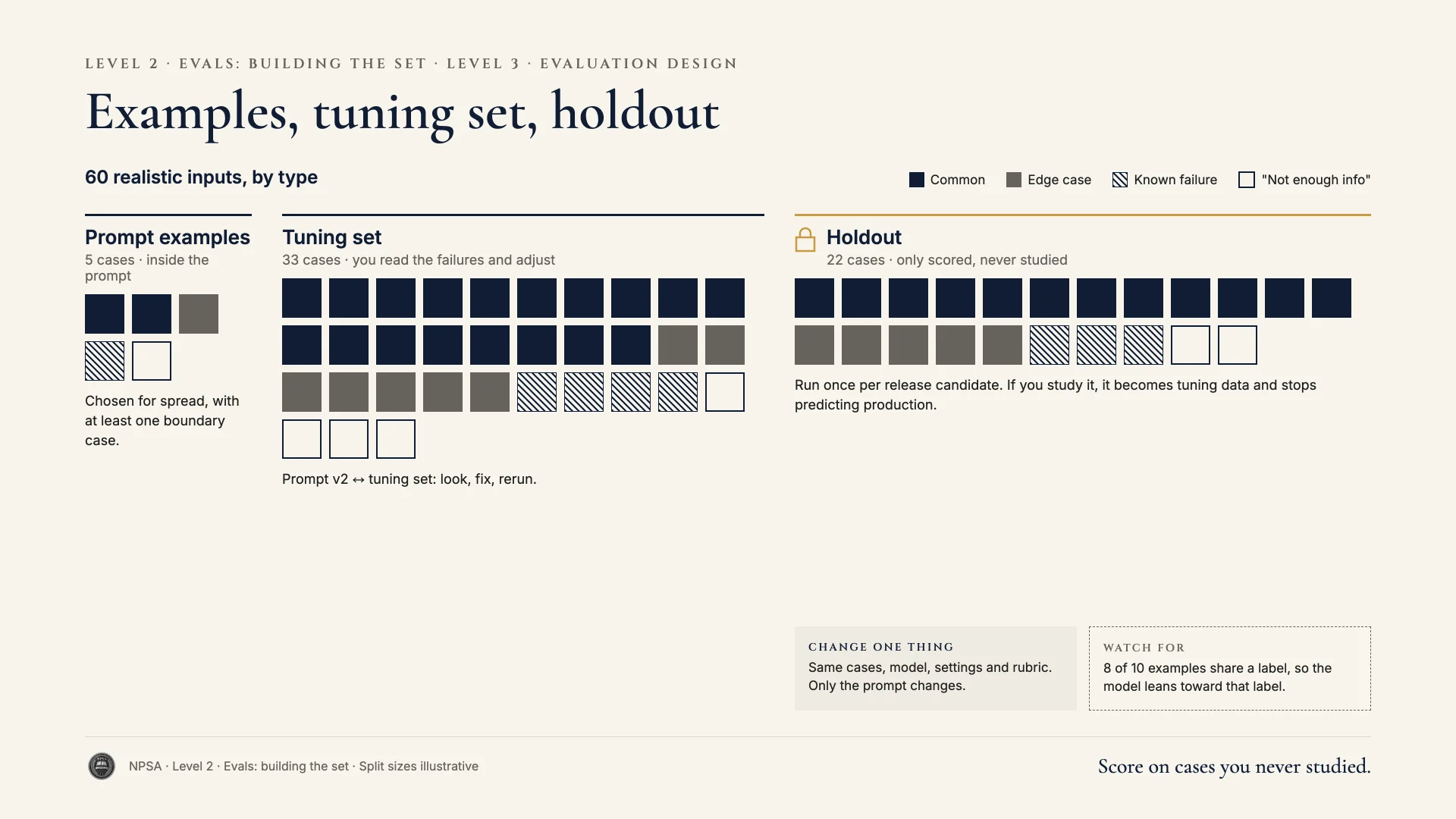
Examples teach whatever they share. If eight of your ten examples are one label, the model leans toward that label. If every example mentions a laptop, it may treat "laptop" as a signal. Balance labels roughly to what matters, vary the surface details, and say in plain words which features decide the label and which don't.
Boundary examples matter most. Easy cases teach little. Include cases near the line between two labels, and a case for "not enough information," labeled consistently. Audit the labels first: an example with the wrong label teaches the wrong rule very efficiently.
Build the test set separately. Collect 30 to 60 real or realistic inputs that cover your common types, your edge cases, and your known failures. Keep them apart from your prompt examples. A prompt that passes on its own examples has proved nothing.
Rubrics need anchors. "Good summary" isn't a criterion. "Mentions the deadline and the dollar amount; under 80 words; no facts absent from the source" is. For scaled criteria, describe what each score looks like so two reviewers would agree.
Change one thing at a time. Compare prompt versions on the same cases, with the same model and settings, scored with the same rubric. Otherwise you can't attribute a change in results.
The same applies to practice questions. A quiz is an eval for people. Each question should map to a lesson objective, have one defensible keyed answer, cite where the lesson teaches it, and avoid material the lesson never covered.
Worked example
Kofi Mensah leads a 12-person IT service desk at a hospital system. He wants a prompt that assigns a priority from P1 (outage affecting care) to P4 (cosmetic request). His current few-shot prompt has ten examples. Seven are P3, none involve clinical systems, and one printer jam is labeled P2 in one example and P3 in another. He tested it on three tickets, and it passed.
Weak approach. Kofi rewrites the instructions to say "be very careful with priority," adds five more P3 examples, and tries it on a new ticket that looks fine. He rolls it out. Within a week, a pharmacy dispensing-cabinet error is labeled P3.
Better approach. Kofi builds the eval first.
- He pulls 50 past tickets with priorities agreed by two senior techs: 8 P1, 12 P2, 18 P3, 8 P4, and 4 keyed as "needs info" because they lacked system or impact, including 6 borderline cases among the P1–P4 tickets. These are the test set. They never appear in the prompt.
- He writes a rubric: correct priority (exact match), "needs info" used when the ticket lacks system or impact, and a one-line rationale citing a phrase from the ticket.
- He runs a zero-shot baseline with written priority definitions. It scores 38 of 50.
- He builds a new example set: two per priority, one boundary case per adjacent pair, one "needs info," with varied departments and devices. He states the invariant: "Priority depends on patient-care impact and number of users affected, not on device type." He fixes the inconsistent printer label.
- Same 50 cases, same model and settings: 46 of 50. He reviews the four misses individually before deciding what to change next.
Before:
Assign a priority P1-P4. Be very careful. Examples: [7 P3, 2 P2,
1 P4, all office devices]
After:
Assign P1-P4, or "needs info" if system or impact is unclear.
Priority depends on patient-care impact and users affected, not
device type.
Examples: 2 per priority, 3 boundary cases, 1 "needs info",
varied departments and systems.
Why this is stronger. The fixed test set measures generalization across real ticket types. The baseline shows the examples earned their place. Balanced, consistently labeled boundary examples and a stated invariant reduce the pull toward P3. Every later change gets compared on the same 50 cases.
Try it
Setup. Pick a classification or rating task you do regularly. In a spreadsheet, collect 25 inputs with the correct answer for each. Include at least 5 borderline or incomplete cases.
Task. Run a zero-shot prompt with written definitions on all 25 and score it. Then add four examples, balanced across labels and including one boundary case, plus one sentence stating the invariant rule. Rerun the same 25 with the same settings.
What a good result looks like. Your spreadsheet shows both runs side by side with a score for each. None of the 25 test inputs appears in your examples. You can say whether the examples helped, and on which cases.
Recap
- Measure a zero-shot baseline before adding examples.
- Balance labels, include boundary cases, audit labels, and state the invariant.
- Keep the test set separate from the prompt and representative of real inputs.
- Write rubrics with observable anchors, and change one thing at a time.
- Build practice questions from objectives, with keys and source references.