Loading lesson…
Coding workflows: spec, tests, review
25 min read
Getting a model to produce code is easy. Getting code a team can review, trust, and change later is the real work. This module covers a workflow for code generation in which the prompt is a structured, versioned specification, tests come from the requirements, and a person reviews both. It draws on a practitioner method published in 2026 and on the practices you already apply to prompts as code.
What you will be able to do
- Write a structured prompt for a code change that separates requirements, design, and limits.
- Order the work so questions are settled before code is generated.
- Derive tests from the requirements, and explain why tests derived from the generated code prove little.
- Keep the prompt and the code in step, so the specification stays true after the change ships.
The idea
The source. Structured-Prompt-Driven Development (SPDD) was described by Wei Zhang and Jessie Jie Xia in an article on martinfowler.com in April 2026, based on work by Thoughtworks' internal IT teams. It is a practitioner report, not a controlled study, so treat it as a well-reasoned method from people who used it and not as measured proof. Its starting point is worth adopting: the hard problem is not generating more code but making generated changes governable, reviewable, and reusable.
The prompt is an asset. In this method, the structured prompt for a change is kept in version control alongside the code it produced. A reviewer reads the prompt to see what was intended and the code to see what was built. When requirements change, the prompt is updated and the code regenerated or edited to match. When someone edits the code directly, the prompt is brought back in line.
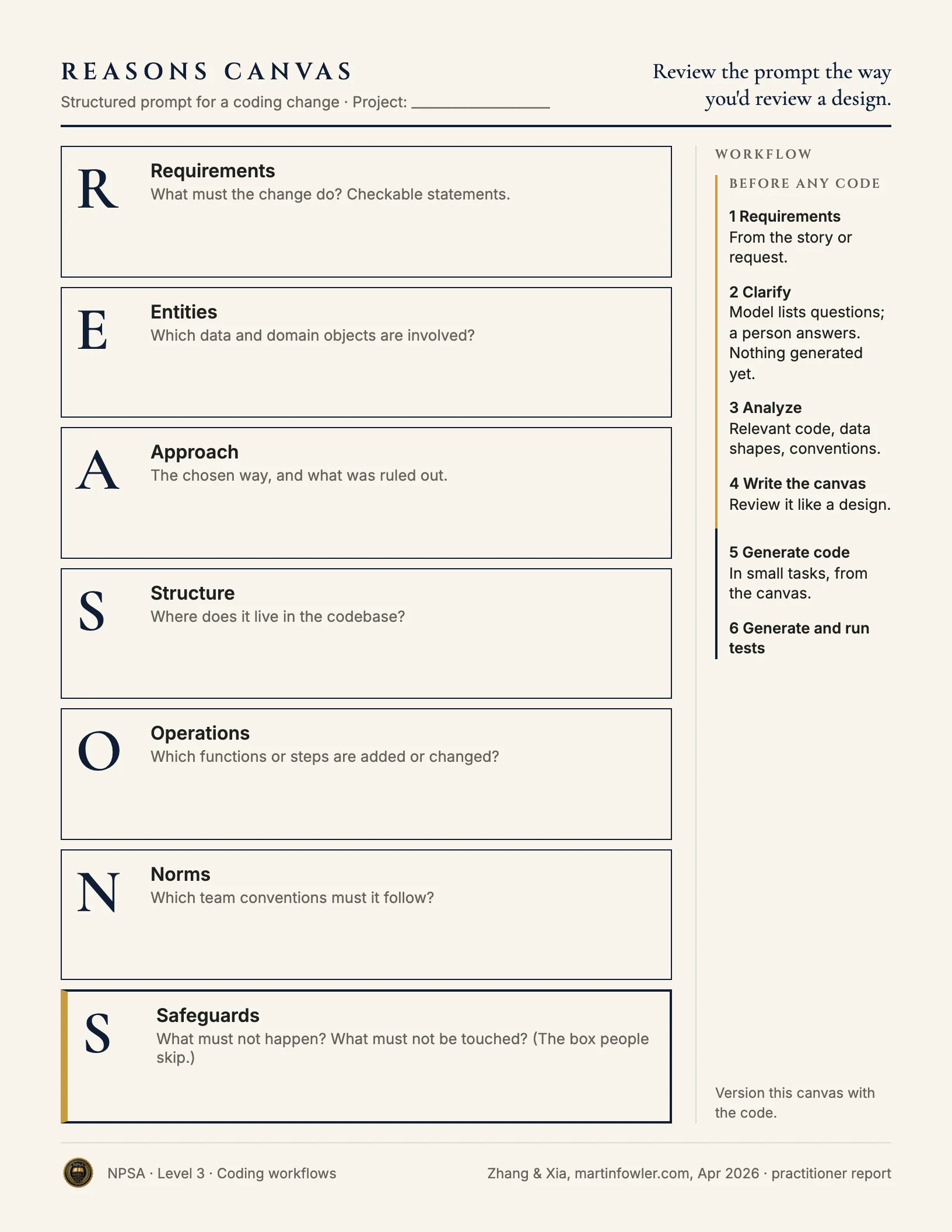
A structure for the prompt. The article organizes a prompt into seven parts, which it calls the REASONS Canvas:
- Requirements: what the change must do, as checkable statements.
- Entities: the data and domain objects involved.
- Approach: the chosen way to solve it, and what was ruled out.
- Structure: where the change lives in the codebase.
- Operations: the specific steps or functions to add or change.
- Norms: the team's conventions the code must follow.
- Safeguards: what must not happen, and what must not be touched.
You don't need the acronym. You need the separation: what is wanted, how it will be built, and what is off limits are three different things, and a prompt that blurs them produces code that is hard to review.
The order of work.
- Requirements. Start from the story or request.
- Clarify. Have the model list ambiguities and questions. A person answers them. Nothing is generated yet.
- Analyze. Gather the context the change needs: the relevant existing code, data shapes, and conventions.
- Write the structured prompt. Review it the way you'd review a design.
- Generate the code, in small tasks, from the prompt.
- Generate and run tests.
Tests come from the requirements. If you ask a model to write tests for code it just wrote, the tests tend to confirm what the code does, including its mistakes. Derive test cases from the requirements section, ideally before or apart from the code, and include the edge cases a person identified in the clarify step. Then run them. A test that was never run is a comment.
Review and run before trusting. Generated code can read well and be wrong. Run it in a sandbox or test environment, never first against production data. A person reviews the change against the requirements and the safeguards. The amount of review follows the impact of the change.
Worked example
Dmitri Volkov is a developer at a company that makes scheduling software for dental practices. Practices want appointment reminders by text message to respect quiet hours: nothing sent between 9:00 p.m. and 8:00 a.m. in the patient's time zone.
Before:
Add quiet hours to the reminder sender so we don't text patients
at night.
The model has to guess the hours, whose time zone applies, what happens to a reminder that falls in quiet hours, and where in the code to make the change. It will pick answers and write confident code around them. The reviewer sees only code and has to reverse-engineer the intent.
After (structured prompt, stored with the change):
REQUIREMENTS
1. No reminder text is sent between 21:00 and 08:00 in the
   patient's time zone.
2. A reminder scheduled inside quiet hours is sent at 08:00 the
   same morning, unless the appointment starts before 09:00.
   In that case it is sent at 20:00 the evening before.
3. If the patient has no time zone on file, use the practice's.
4. Email reminders are not affected.

ENTITIES
Reminder (id, patient_id, channel, send_at), Patient (time_zone,
nullable), Practice (time_zone, required).

APPROACH
Adjust send_at when the reminder is scheduled. Do not filter at
send time. Ruled out: dropping reminders in quiet hours.

STRUCTURE
Change only reminders/scheduler. No changes to the sender or to
the database schema.

OPERATIONS
Add a function that takes a proposed send time, the appointment
start, and a time zone, and returns the adjusted send time.
Call it from the existing scheduling function for text
reminders only.

NORMS
Follow the existing date handling in reminders/. Store times in
UTC. Match the current naming and error handling.

SAFEGUARDS
Do not change behavior for email. Do not send any reminder
after its appointment has started. If a rule above can't be
satisfied, raise an error. Do not pick a time silently.
Before writing this, Dmitri ran a clarify prompt. It asked what happens on the day clocks change, which he hadn't considered. He added a test case for it. A separate prompt generates tests from the four requirements and the safeguards, without seeing the new code. He runs them in the test environment. One fails: a 08:30 appointment was getting an 08:00 reminder the same morning. He fixes the code, the tests pass, and a colleague reviews the prompt and the change together.
Why this is stronger. Each decision the first prompt left to the model is now written down and reviewable. The safeguards say what must not change, which is what reviewers most often have to guess. Tests built from the requirements caught a case where the code and the requirement disagreed. Six months from now, the stored prompt tells the next developer what this code was meant to do.
Try it
Setup. Pick a small change to something you work with: a spreadsheet formula, a script, a report query. If you don't write code, choose a rule-based task such as "flag invoices over 30 days late, except those in dispute."
Task. Run a clarify prompt first: ask for questions and ambiguities only, and answer them. Then write a structured prompt with at least requirements, approach, and safeguards. Write three test cases from the requirements before you generate anything. Generate the change and check it against your cases.
What a good result looks like. The clarify step raised at least one question you hadn't settled. Your test cases were written before you saw the output. You can point to a safeguard that prevented, or would have prevented, an unwanted change.
Watch for this
- A structured prompt that nobody updates becomes a wrong description of the code. Change them together.
- Passing tests show the code meets the cases you wrote. They don't show the cases were complete.
- Long generated changes are hard to review. Generate in small tasks.
Recap
- Treat the prompt for a code change as a specification stored with the code.
- Separate what is wanted, how it is built, and what is off limits.
- Clarify before generating. A person answers the questions.
- Derive tests from requirements, not from the generated code, and run them.
- Run generated code in a safe environment, and have a person review it.
Sources
- Zhang, W., and Xia, J. J. (2026). "Structured-Prompt-Driven Development (SPDD)." martinfowler.com, April 28, 2026. Practitioner report from Thoughtworks.